

70% of Copilot users are more productive because of it, according to Microsoft, but adoption alone is not the full story. The greater opportunity lies in moving beyond basic chat and building an agent that can act on a task, not just answer a question. This recap of our live webinar, “Build Your First AI Agent With Microsoft Copilot,” covers how to build an AI agent in Microsoft Copilot Studio, a process that requires no coding experience.
The session was hosted by Danny Galli, Technical Account Manager at Sparta Services, and Ards Sapasap, Senior Power Platform Developer at Sparta, who presented the business case for AI agents, a practical six-step framework for building one, two live demonstrations in Copilot Studio, and guidance on choosing the right first project. The full recording is available here, and the complete recap follows below.
From Chatbots to Agents: What “AI Agent” Actually Means
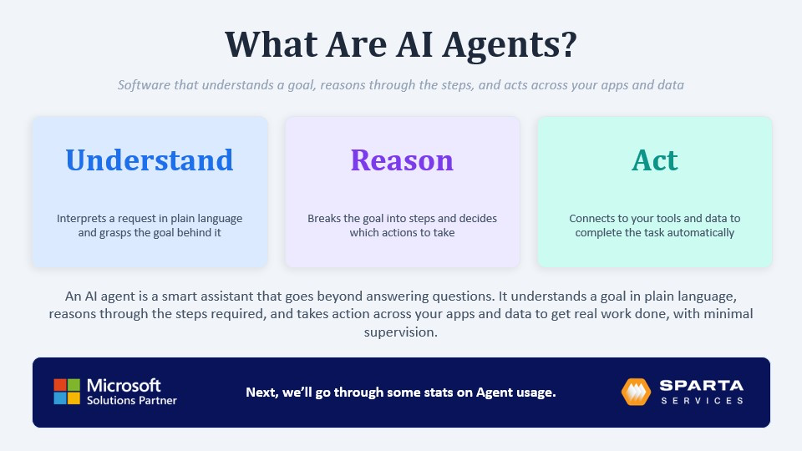
An AI agent is software that understands a goal, reasons through the steps needed to reach it, and then takes action on your behalf. This represents a shift from the chatbots most people have used at work over the past several years, which typically answer a single question and stop there.
- Understand: you describe what you need in plain English, and the agent identifies the intent behind it.
- Reason: it breaks the goal into steps and decides which actions make sense.
- Act: it connects to your tools and data to complete the task, requiring minimal ongoing guidance.
The key distinction from a general AI chatbot is that a Copilot agent operates within your Microsoft 365 environment, grounded in your own SharePoint content, Dataverse records, and Teams data rather than the open internet. Through connectors, it can also do more than retrieve information. It can post in Teams, initiate an approval, draft or send an email in Outlook, or trigger a Power Automate workflow, all while respecting the permissions and governance your IT team has already established.
The Business Case: Why Agents, Why Now
Danny highlighted several notable statistics:
- 75% of knowledge workers already use AI tools at work in some capacity, often through personal accounts and with company information, without any organizational strategy in place.
- 70% of Copilot users report being more productive, according to Microsoft’s own usage data.
- Roughly 40% of the average workday involves tasks that are at least partially automatable: email drafting, status updates, information lookup, document summarization, meeting preparation.
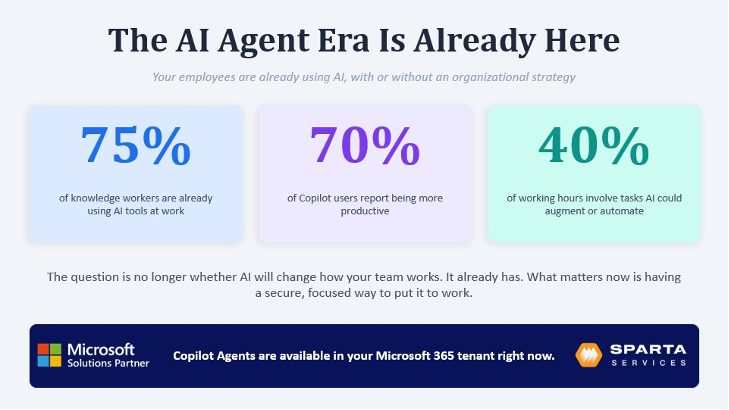
The takeaway is not that this shift is coming. It is already happening, with or without a plan. Organizations that invest early are building structure and enablement around AI rather than attempting to restrict its use. This is not a future roadmap item. It is available in most Microsoft 365 tenants today.
How to Build an AI Agent in Copilot Studio: A 6-Step Framework
Whenever you sit down to build an agent in Microsoft Copilot Studio, there are six things worth working through, in order:
- Intention: What is the agent’s job? Who is it for? What triggers it, and where does it need to appear? Keep the scope narrow. An agent that attempts to handle several unrelated tasks rarely performs any of them well.
- Instructions: Tell the agent, in plain English, who it is, what steps to follow, and which tools and knowledge to reach for. Vague instructions are the most common reason an agent produces unreliable results.
- Knowledge sources: Direct it to SharePoint, Dataverse, Dynamics records, specific websites, or uploaded files. This grounds answers in your organization instead of a generic internet response.
- Actions and orchestration: New agents default to generative orchestration: an LLM-powered planning layer that reads intent, breaks it into steps, and dynamically decides which tools, topics, or knowledge sources to call. It can chain several actions together in one turn, or pause to ask a clarifying question. It performs only as well as the plain-language descriptions provided for each tool and topic, since that is what the orchestrator reads to determine what to use.
- Guardrails: Data loss prevention, sign-in controls, content filters, and security policies are built into Copilot Studio out of the box, layered on top of whatever your Microsoft environment already enforces.
- Measurement: The work is never truly finished. Testing, monitoring analytics, and tuning the agent over time are essential, since the agents that remain in use are the ones that continue to improve.
Two Live Demonstrations: From Answering Questions to Taking Action
Ards then built two agents live in Copilot Studio, demonstrating that neither required a line of code.
Demonstration 1: A Community FAQ Assistant
The first build was intentionally simple: a Q&A agent for a homeowners’ community, covering topics such as pool hours, pet rules, and trash collection days. It needed three ingredients: a short description, plain-English instructions, and one reference document (a PDF of community guidelines).
The instructions told the agent to answer in a short, friendly tone and, critically, to say so and direct residents to the management office if an answer was not in the document rather than guess. Live testing showed the behavior working as designed:
- “What are the pool hours?”’ –> answered directly from the document.
- “Can I paint my front door blue?” –> recognized this was not a clear yes or no in the guidelines and directed the resident to submit a request instead of guessing.
- A compound question asking about pool rules *and* guest policy in one message received both answers in a single response.
Demonstration 2: An HR Assistant That Takes Action
The second demonstration moved from generative Q&A to a genuinely agentic build: one that does not just answer questions but files a leave request on the employee’s behalf.
Behind the scenes, this used three connected pieces: Copilot Studio for the agent, Power Automate to route the request to a manager and log it, and a SharePoint list as the system of record. Ards built that list live, with columns for employee, leave type (SL for sick leave, VL for vacation leave), start date, end date, reason, and status: submitted, approved, or rejected.
Inside the agent, “topics” acted as the script: a trigger phrase like “file a leave” initiated a guided conversation. In the live test, the agent asked whether the request was sick or vacation leave, collected a start date, end date, and reason, submitted the request, confirmed it back to the employee, and logged the complete request into the SharePoint list in real time.
It also addressed informational HR questions, such as “How many vacation days do I get?” and “Can I work from home?”, drawing answers from uploaded HR policy documents and routing questions that required human judgment directly to HR.
Where AI Agents Deliver the Fastest ROI
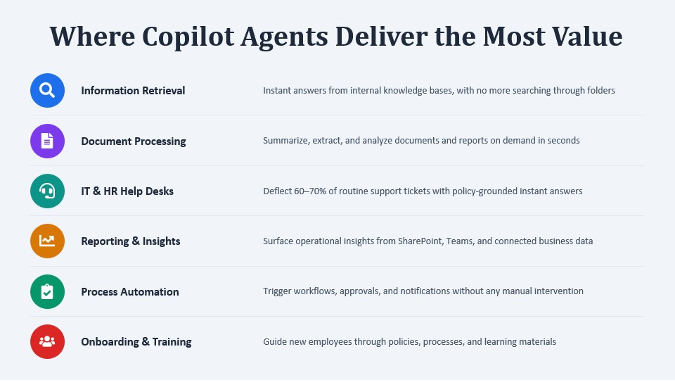
The categories where Sparta consistently observes the strongest return on investment include:
- Information retrieval. Instant answers from your own content (policies, decks, contracts). For many organizations, this category alone justifies the investment.
- Document processing. Summarizing a 40-page contract in 30 seconds, extracting key dates and obligations, and flagging language that requires human review. A significant benefit for legal, finance, and procurement teams.
- HR help desks. A well-built agent with robust knowledge sources can resolve an estimated 60 to 70% of password reset, account, leave, and benefits inquiries without human intervention.
- Reporting and insights. Connecting an agent to SharePoint lists, Teams data, or operational systems allows employees to request figures on demand instead of waiting for someone to compile a report.
- Process automation. A simple request in Teams can trigger a Power Automate workflow that produces a concrete outcome with no manual steps required.
- Onboarding and training. New hires receive a resource that answers role-specific questions, directs them to relevant materials, and confirms training completion.
How to Pick Your First AI Agent Use Case
The technology is the easy part. Picking the right first task determines whether a project succeeds. Danny offered a simple six-question test: the more questions you can honestly answer “yes” to, the better the fit for your first agent.
- Is it repetitive and frequent? Does it happen often, in more or less the same way each time?
- Is it rules-based and predictable? If you could not explain the steps to a new hire on day one, an agent will likely struggle too.
- Is it time-consuming? Does it require significant hours across the team every week?
- Is it information-heavy? Is it mostly about finding, sorting, or summarizing existing information, rather than something that needs human judgment or negotiation?
- Is it low-risk? If the agent produces an incorrect result, is the mistake easy to identify and correct?
- Is the data within reach? Does the information live somewhere you can actually connect to, like SharePoint or Dataverse, rather than locked in someone’s head?
A “yes” across the board is not required. However, if only one or two criteria are met, it is worth continuing to look elsewhere. The friction will likely outweigh the value. A task that satisfies most of these criteria is where a first agent is likely to perform best, and an early, visible success builds the credibility needed to pursue subsequent projects.
Best Practices Before You Launch
A few practices distinguish agent projects that succeed from those that stall without producing results:
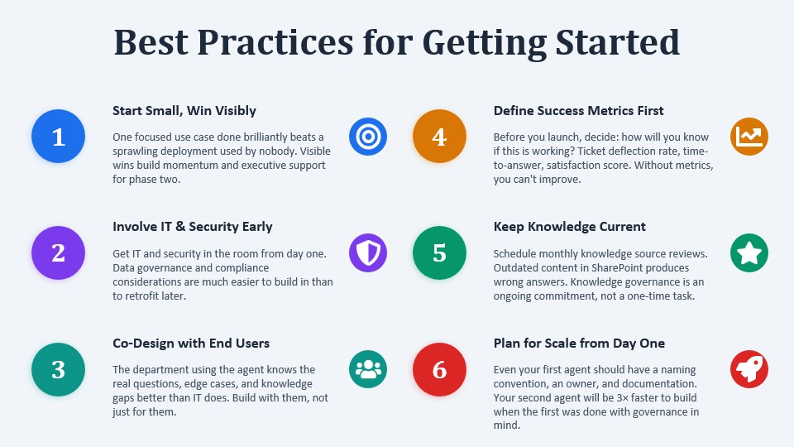
- Start small and demonstrate value quickly. One focused use case executed well outperforms an elaborate platform that goes unused.
- Involve IT and security from the outset. Include them in the initial kickoff rather than a last-minute review immediately before deployment.
- Co-design with end users. HR and IT teams understand the questions employees actually ask and the tickets that regularly arise. Build with these teams, not solely for them.
- Define success metrics before launch. Use Copilot Studio’s built-in analytics and establish a baseline first, so there is a clear point of comparison.
- Keep the knowledge current. Stale content is the most common reason agent performance declines over time. Schedule a recurring monthly review to keep sources up to date.
- Plan for scale from day one. Document naming conventions and a governance model starting with the first agent, and subsequent agents will be significantly faster to build.
How Sparta Can Help
The framework outlined above can be implemented independently. For organizations that prefer additional support, Sparta engages across three phases:
AI readiness assessment
Before any development begins, Sparta identifies an organization’s highest-value use cases and pressure-tests them, including whether the underlying data and permissions are genuinely ready. This is a critical consideration: an agent inherits the permissions associated with whatever data it can access, so Sparta maps the data each candidate use case would touch, evaluates the underlying permission model, and flags oversharing or sensitive exposure before a single query runs. Cost is also addressed: usage-based consumption can escalate quickly, so the assessment identifies which use cases justify the investment and what guardrails should be established in advance.
Building more complex agents
A simple Q&A bot is straightforward to build independently. Sparta adds the greatest value with more complex engagements: multi-step agents that draw from multiple knowledge sources, trigger approvals, and orchestrate complete business workflows end to end.
Partnering from pilot to production
Sparta remains engaged through governance, adoption, and training, refining the agent based on user feedback and maintaining guardrails as deployment scales from an initial pilot group to the full organization.
How to Build an AI Agent: Get Started with Sparta
AI agents are not a future roadmap item. They are available in most Microsoft 365 tenants today, and as both demonstrations showed, building one does not require a developer. Organizations that realize the greatest value start with a small, well-scoped use case and build with security and adoption in mind from the outset.
For organizations seeking a clear, prioritized starting point, an AI readiness assessment offers a low-commitment path forward. Get in touch to schedule a consultation, or explore our Copilot solutions to learn how Sparta supports the full agent lifecycle, from initial build to full rollout.
Frequently Asked Questions About Building an AI Agent
How do you build an AI agent in Microsoft Copilot Studio?
Start with intention (define the job and scope), add plain-English instructions, connect knowledge sources like SharePoint or Dataverse, configure actions and orchestration, apply guardrails, and test and tune the agent over time. Both agents in the webinar were built live using this exact sequence, without writing any code.
What is the difference between a chatbot and an AI agent?
A chatbot answers a question and stops. An AI agent understands a goal, reasons through the steps to reach it, and takes action across your connected tools and data, all inside your existing Microsoft 365 permissions.
Do you need to know how to code to build an AI agent?
No. Both agents in the webinar, a community FAQ assistant and an HR assistant that files leave requests, were built live in Copilot Studio using plain-English descriptions, instructions, and uploaded documents.
What can an AI agent do inside Microsoft 365?
It can answer questions grounded in your SharePoint, Dataverse, and Teams content, and it can take action: posting in Teams, drafting or sending Outlook email, initiating approvals, or triggering Power Automate workflows.
What is a good first AI agent project to build?
Look for a task that is repetitive, rules-based, time-consuming, information-heavy, low-risk, and dependent on data that is already accessible. The more of these criteria a task meets, the better suited it is to serve as a first agent.

Dave Galy
Dave Galy is the founder and CEO of Sparta Services